SalesCatalysts is not merely a tool for sending email and SMS campaigns. It is built upon a contact management system. This system combines contact management with data applications, providing you with a one-stop service without any additional cost.
¶ What Is the SalesCatalysts Contact Management System?
The SalesCatalysts contact management system is similar to a basic membership management system, offering you a systematic way to comprehensively manage contact information and related communication records. With this system, you can manage your contacts more efficiently and enhance the effectiveness of your campaigns.
This system is especially suited for users who have not yet adopted a dedicated membership management system or for individuals and businesses that currently rely on Excel to manage member data. Through this contact management system, you can significantly improve work efficiency, reduce potential human errors, and fully leverage the value of your member data to help grow your business.
¶ Core Advantages
- Zero Additional Cost: Store contact information for free, reducing operational expenses.
- Group Categorization Functionality: Easily categorize contacts according to your needs, enabling precise marketing.
- Spelling Error Detection: When manually entering contacts, the system can instantly detect common email address spelling mistakes.
- Time and Effort Saving: No need to re-import recipients for every campaign, streamlining your workflow.
- Communication Record Management: Establish a complete record of communications for each contact, facilitating tracking and analysis.
- API Integration: Provides a robust API that supports integrating and manipulating data from multiple external systems.
¶ Do I Have to Use the Contact Management System?
If your primary goal is to use SalesCatalysts to send email and SMS campaigns, you do not have to use the contact management system. You can choose according to your business needs.
Before deciding whether to use the contact management system, it is recommended that you gain an in-depth understanding of how to select appropriate recipients for your campaigns.
¶ How to Select Recipients for Marketing Campaigns
You can choose recipients for email, SMS, or MMS campaigns using one of the following three methods. Only when you select recipients by [Select Group] is the use of the contact management system required.
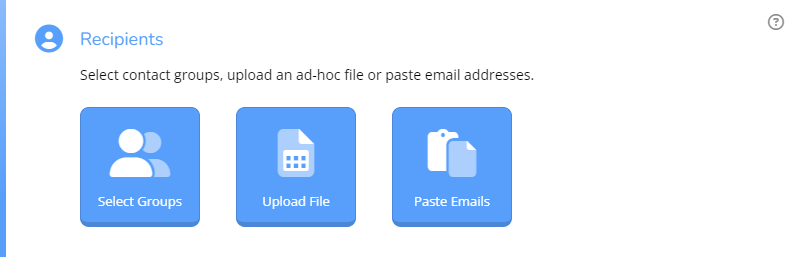
¶ 1. Select Group
This method requires the use of the contact management system.
Directly select the [Groups] within the system as recipients, or choose recipients from previous campaigns.
This method utilizes the SalesCatalysts contact management system. You can permanently store and manage contacts within the system, avoiding duplicate data uploads. You can directly send email or SMS campaigns to [Groups], simplifying the process and significantly enhancing efficiency.
¶ 2. Upload a File
This method does not require the use of the contact management system.
Instantly upload an Excel or CSV file containing contact information to be used as recipients for your campaign.
This method is ideal for users who have their own membership management system. You can export the appropriate recipients from your own system and then upload the Excel or CSV file into SalesCatalysts.
¶ 3. Paste Email Addresses or Mobile Numbers
This method does not require the use of the contact management system.
Directly paste or manually enter email addresses or mobile numbers, which is particularly suited for small-scale send-outs or follow-up messages.
This method is ideal for campaigns targeting a small number of recipients. For example, if you realize that you forgot to include certain recipients in a previous campaign, you can quickly remedy the oversight by duplicating that campaign and pasting in the missing recipients for a follow-up send.