After setting up [Recipient], you need to provide the [Sender Information] for the email campaign, which includes:
- [Sender]
- [Reply-to]
- [Subject]
- [Preheader]
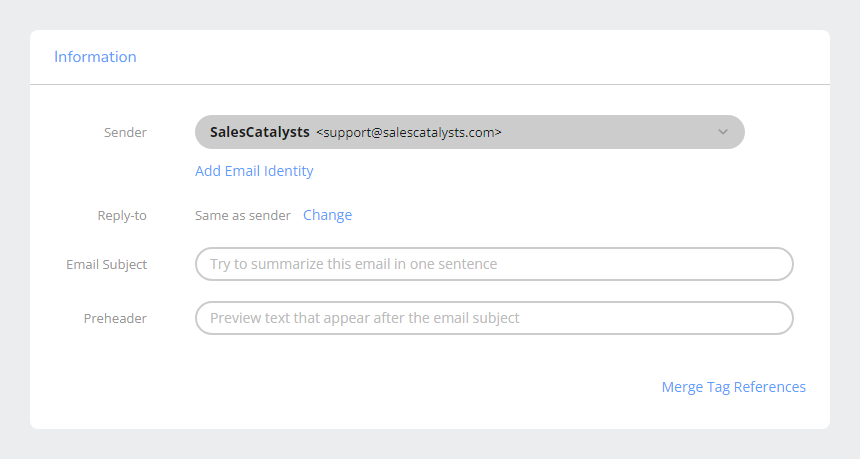
¶ Sender And Reply-to
[Sender] and [Reply-to] must be selected from your configured [Email Identity]. Each [Email Identity] consists of a [Name] and an [Email Address].
- To help recipients recognize you, it is recommended to use the same [Email Identity] as the [Sender] across all email campaigns whenever possible.
- Different [Email Identity] may only be needed when sending campaigns of different nature.
- You can use different [Email Identity] for [Sender] and [Reply-to], so that replies from recipients are directed to the appropriate email address.
¶ Add an Email Identity
To add a new [Email Identity], you must provide a [Name] and a valid [Email Address]. Once provided, the system will send a verification code to confirm ownership and validity of the email address. You must enter the verification code to complete verification before the new [Email Identity] can be used.
If the [Email Address] encounters bounce issues, the [Email Identity] will revert to [Unverified] status. You must fix the issue and reverify before continuing to use it.
Regardless of bounce history, all [Email Identity] must be reverified every 180 days to ensure ongoing validity.
¶ Why Reverify Every 180 Days?
Regular reverification of [Email Identity] is not only a system requirement but also an important measure to ensure stability and professionalism of email campaigns. Reverification every 180 days achieves the following:
Security: Prevents unauthorized use of email addresses, reducing the risk of impersonation. This protects both your email address and recipient safety.
Deliverability: Ensures the [Sender] is trusted, helping reduce emails being marked as spam or rejected by servers, thereby improving overall deliverability.
Validity: Email addresses may become invalid due to organizational changes, domain expiration, or mailbox deactivation. Regular verification helps identify and fix issues early, avoiding use of invalid addresses in campaigns.
Professional Image: Using verified and valid [Email Identity] makes it easier for recipients to recognize and trust your emails. This improves open and click rates and strengthens brand professionalism.
¶ System Reminder Mechanism
To ensure you do not miss the verification deadline for [Email Identity], the system sends reminder notifications at different times to help you complete verification early and avoid disruption of campaigns. The reminders are as follows:
- 30 Days Before Expiry: First reminder.
- 15 Days Before Expiry: Second reminder.
- 3 Days Before Expiry: Third reminder.
- On Expiry Date: If verification is not completed, the system sends an expiry notice, informing that the [Email Identity] has reverted to [Unverified] status and must be reverified before use.
¶ What Happens When Verification Expires?
- When the 180-day period expires without verification, the [Email Identity] reverts to [Unverified] status.
- In this status, you cannot use the [Email Identity] as [Sender] or [Reply-to] for campaigns. Any campaigns in [Draft] status cannot be scheduled or sent. However, campaigns already in progress will not be affected.
- If you only have one [Email Identity], you will not be able to send any campaigns. You must reverify the expired [Email Identity] or add and verify a new one.
¶ How To Reverify?
You can log in to the system at any time to perform [ReVerification] of an [Email Identity].
- Upon successful verification, the 180-day validity period resets.
- It is recommended to complete verification immediately upon receiving reminders to ensure uninterrupted campaigns.
¶ Rules On Email Identity
- Email addresses must be genuine and valid.
- Free or public email addresses such as
@gmail.com,@yahoo.com,@outlook.comare not accepted. Owners of these domains typically reject recognition of third-party sending platforms using their domain identities, so they cannot be used. - Avoid using no-reply addresses such as
no-reply@,noreply@, ordonotreply@. Recipients are not obliged to understand that these addresses do not reply, and in many platforms, the email address may be hidden under the sender name. Using non-reply addresses while ignoring recipient replies or inquiries is impolite, creates poor customer experience, and may cause you to miss unsubscribe requests sent via reply. - Use the sender email address and domain specified in the subscription process. Do not arbitrarily change the [Email Identity], nor replace it with any third-party identity to send promotional messages using your subscription list. Since subscription consent cannot be transferred, this behavior is considered spamming.
- Use a sender email address and domain consistent with the email content. The domain should link to a legitimate website. Do not use third-party addresses or domains that attempt to obscure the true business entity or individual.
You may add multiple [Email Identity] as needed, but each must be verified before use. Although multiple identities can be added, it is recommended to maintain consistency across campaigns so recipients can easily recognize you and to build a good reputation with email security systems. Frequent changes of sender identity may cause these systems to classify you as a spam sender.
Using non-compliant [Email Identity] may cause recipients, email platforms, security systems, or blacklists to treat your emails as spam, leading to unsubscribes or spam complaints. You may also violate our service usage policy.
¶ Properly Changing Email Identity
If you need to change [Email Identity] (e.g., company name or domain change), the proper approach is to send a notification under the original identity, informing users in advance that you will use a new identity and reminding them to add the new identity to their whitelist.
¶ Email Subject
Use concise, powerful, and descriptive email subjects, keeping the length between 50 and 100 characters.
¶ Preheader
The preheader is a short piece of text that appears after the subject line in many email platforms. Displayed alongside the subject, it helps recipients better understand the email content.
If you do not customize the preheader, many platforms automatically use the first line of the email content as a substitute, such as “If you cannot see this email, view it in your browser” or “Click here to unsubscribe.” These lines look odd, meaningless, and waste valuable space. Proper use of preheader text alongside the subject increases the chances of recipients opening and reading the email.
We recommend preheader length between 50 and 100 characters. In mainstream platforms like Gmail, the subject and preheader share the same line and limited display length. Therefore, if the subject is too long, it reduces the visible space for the preheader.